

PACI online appointment, Civil ID Reservation System, Kuwait PACI appointment – iiQ8
Dear All, here are the details about the PACI online appointment, Civil ID Office Book appointment system | Kuwait Government – PACI Public Authority for Civil Information announced that, the public can collect their Civil ID from
Sunday, 5th July from 9:00 AM to 1:00 PM at their office and extends until 5:00 PM.
The entry will be only through prior booking, and PACI will start receiving online appointment booking on
PACI website below mentioned from 4th July, 2020 i.e., Saturday once in a week to in order to reduce the congestion.
PACI Visitors Guidelines for Preventing the Spread of Coronavirus Disease (COVID-19)
For Appointment Reservation – click on APPOINTMENT BOOKING mentioned below.
– Wearing a face mask which should cover the nose at all times within the Authority.
– Visitors are strictly prohibited to visit any administration offices or enter the administrative building.
– Visitors should comply by maintaining social distancing rules, following the floor markings, avoid shaking hands and close contact with others in the Premises.
– Entry is prohibited for visitors to whose temperature measures 37.5’ Celsius or above.
– Visitors will not be allowed to enter PACI premises without a prior appointment, If a visitor arrives maximum 30 minutes late after his appointment, the appointment will be considered as cancelled.
– Visitor should come to PACI, with photocopies of the official documents required for his transaction, as the photocopying services at PACI will be closed.
How to Book an Online Appointment with PACI (Civil ID Office) in Kuwait – Complete Step-by-Step Guide
| Who needs this | Citizens and residents needing to visit a PACI branch — new Civil ID, renewal, replacement, address/data updates, card collection |
| Where to book | Meta Kuwait portal — meta.e.gov.kw (also linked from paci.gov.kw) |
| What you need | Civil ID number, Civil ID serial number, Kuwait mobile number, email address |
| Mandatory | Appointments are required for nearly all PACI services — walk-ins are generally not accepted |
| Time to complete registration | 10–15 minutes (one-time, including OTP verification) |
| Cost | Booking is free; separate fees apply for the underlying Civil ID service (delivery, fines, etc.) |
| Support | Phone: 1889988 |
Why You Need an Appointment for PACI
The Public Authority for Civil Information manages everything tied to your Civil ID — issuance, renewal, replacement, data updates, and card collection. Because PACI branches handle extremely high daily volume, almost every service now requires a pre-booked appointment through Meta, Kuwait’s unified government-appointments platform. Booking ahead isn’t just a convenience here — for most services, it’s the only way in.
PACI also maintains its own website (paci.gov.kw) with an e-Services portal covering civil card services, status/validity checks, and card or fine payments — but the actual appointment booking itself routes through Meta either way, so the steps below are the ones that matter regardless of which site you start from.
Step 1: Register a Meta Kuwait Account (First-Time Users)
- Go to meta.e.gov.kw in your browser.
- On the login page, click Register as a New User.
- Enter your 12-digit Civil ID number.
- Enter your Civil ID Serial Number — this is a shorter alphanumeric code (typically 9–10 characters) printed on the back of your Civil ID card, not the front. If the print is faded or you can’t locate it, a PACI branch can print/confirm it for you.
- Enter your Kuwait mobile number and email address.
- Read and accept the terms and conditions, then click Register.
- Check your phone for an OTP SMS and enter the code in the verification field.
- Check your email (including spam) for a verification code and enter it.
- Create a password (a mix of letters, numbers, and symbols is recommended) and confirm it.
- Registration is complete — you can now log in.
Common snag: if the mobile number registered with PACI is outdated, the OTP simply won’t arrive. This trips up more first-time users than any other step — if your SMS never comes through, the fix is to update your mobile number at a PACI branch first, then return to complete registration online.
Step 2: Log In
- Go to meta.e.gov.kw.
- Enter your 12-digit Civil ID number.
- Enter your password.
- Optionally check Remember Me for faster future logins.
- Click Login.
Forgot your password?
- Click Forgot Password on the login screen.
- Enter your Civil ID number.
- Follow the reset link/code sent to your registered email or phone.
- Set a new password and log in.
Step 3: Search for and Select PACI
- From your dashboard, click Appointments Search (or the + icon for a new appointment).
- Select Public Authority for Civil Information (PACI) from the list of agencies.
- Choose the department relevant to your need (e.g., Civil Card Services, Address/Data Updates).
- Click Search Services or browse the list.
Step 4: Choose the Specific Service
Select the exact service you need, for example:
- New Civil ID issuance
- Civil ID renewal
- Lost/damaged Civil ID replacement
- Address or personal data update
- Civil ID collection/delivery appointment
Click Apply on the correct service.
Step 5: Choose Branch, Date, and Time
- Select your preferred PACI branch — pick whichever is closest to you or has earlier availability.
- Click Continue/Next.
- Choose an available date from the calendar.
- Select a time slot.
- Review the summary — service, branch, date, time — before confirming.
Step 6: Confirm the Booking
- Click Confirm.
- You’ll receive a confirmation with a barcode/QR code, usually by email and/or SMS.
- Save the barcode — you’ll need to show it (digitally or printed) at the branch entrance.
Collecting Your Civil ID Card
Once your Civil ID has been processed, collection also requires a booked slot through the same Meta flow (Service: Civil ID collection/delivery). Standard collection windows at PACI branches run:
- 8:00 AM – 1:00 PM
- 3:00 PM – 7:00 PM
Bring your booking confirmation and, if applicable, your old/damaged card or any documents requested at booking.
Booking for a Lost or Damaged Civil ID
If your card is lost, stolen, or damaged, the process runs through the same system with a specific service selection:
- Log in to Meta (register first if you haven’t already).
- Go to Appointments Search → PACI.
- Select the lost/damaged Civil ID replacement service.
- Provide the requested details — civil number, and any supporting information requested (e.g., passport details for identity confirmation).
- Choose your branch, date, and time.
- Confirm the booking, then attend with any required supporting documents (a police report may be required for a lost card, depending on current PACI policy — confirm this at booking or by calling PACI directly).
Paying Civil ID Fees or Fines Online
PACI’s own e-Services portal (paci.gov.kw) supports online payment separately from the appointment system, for things like:
- Card delivery/collection fees
- Late renewal fines
- Civil ID payment inquiries — enter your Civil Number, review the amount due, and pay directly
This means you don’t necessarily need to handle payment in person at the branch if it can be settled online beforehand — worth checking before your appointment to save time on-site.
Managing, Rescheduling, or Cancelling an Appointment
To check your appointment:
- Log in to Meta → My Appointments
To reschedule:
- Meta generally does not offer direct time-editing — cancel the existing appointment, then book a new slot through Appointments Search again.
To cancel:
- Open the appointment under My Appointments → Cancel → confirm.
Common Issues & Fixes
| Problem | Fix |
|---|---|
| OTP never arrives during registration | Your mobile number on file with PACI is likely outdated — update it in person at a branch, then register online |
| Registration rejected | Double-check Civil ID number vs. the shorter serial number on the back of the card — the most common mismatch |
| Login fails | Confirm you’re using your Civil ID number (not email) as the username; use Forgot Password if unsure |
| No slots available for your branch | Check early morning for newly released slots, or try a nearby branch |
| Confirmation barcode/email missing | Check spam folder; verify your mobile and email are correct in your Meta profile |
| Unsure if you need a police report for a lost card | Call PACI support (1889988) before your appointment to confirm current documentation requirements |
| Payment not reflecting before appointment | Allow processing time after paying online, or bring proof of payment to the branch as a backup |
Frequently Asked Questions
Can I walk into a PACI branch without an appointment?
Generally no — appointments are required for nearly all services, and walk-ins are usually not accepted given the volume PACI branches handle daily.
How do I find my Civil ID serial number?
Flip your Civil ID card over — it’s the shorter alphanumeric code (usually 9–10 characters) on the back, separate from your 12-digit Civil ID number on the front.
Do I need an appointment just to collect my card once it’s ready?
Yes — collection also goes through a booked appointment, typically available during the 8 AM–1 PM and 3 PM–7 PM windows.
Can I pay Civil ID fees or fines without visiting a branch?
Yes — PACI’s e-Services portal supports online payment for card fees and fines directly, separate from the appointment booking system.
What if I lose my Civil ID — do I need to file a police report first?
Requirements can vary, so it’s best to confirm directly with PACI (1889988) or check the specific replacement service details when booking, rather than assume.
Can I reschedule an appointment without cancelling it first?
No — Meta doesn’t currently support direct rescheduling. You need to cancel the existing booking and create a new one.
Is there a customer support line if I run into issues with the portal?
Yes — PACI support can be reached by phone at 1889988 for direct assistance with e-services and appointment-related issues.
Is booking through Meta the only way, or can I still use paci.gov.kw directly?
Both point to the same underlying booking system — paci.gov.kw links out to Meta for the actual appointment scheduling, so the steps are effectively identical either way.
Note: PACI’s services, fees, and documentation requirements (especially around replacements and renewals) are updated periodically, and reported fee changes should always be verified directly with PACI or on the live portal before you rely on them. If any step or menu label above doesn’t match what you see live on meta.e.gov.kw, treat the live portal as the source of truth — the core route (Meta Kuwait → Appointments Search → PACI → select service → branch → date/time) is the reliable constant to fall back on.
Make PACI Website Online Appointment ( Reservation of Date and Time to visit PACI )
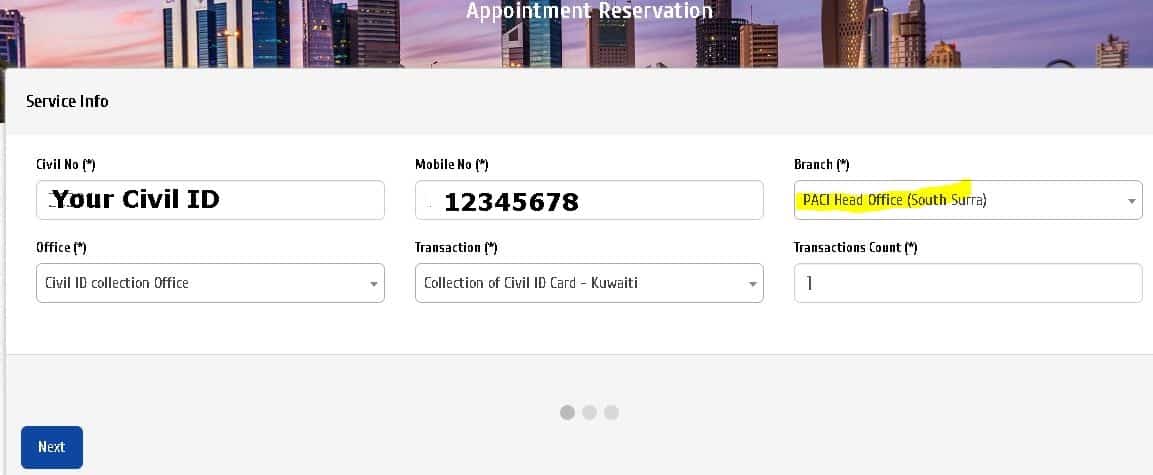
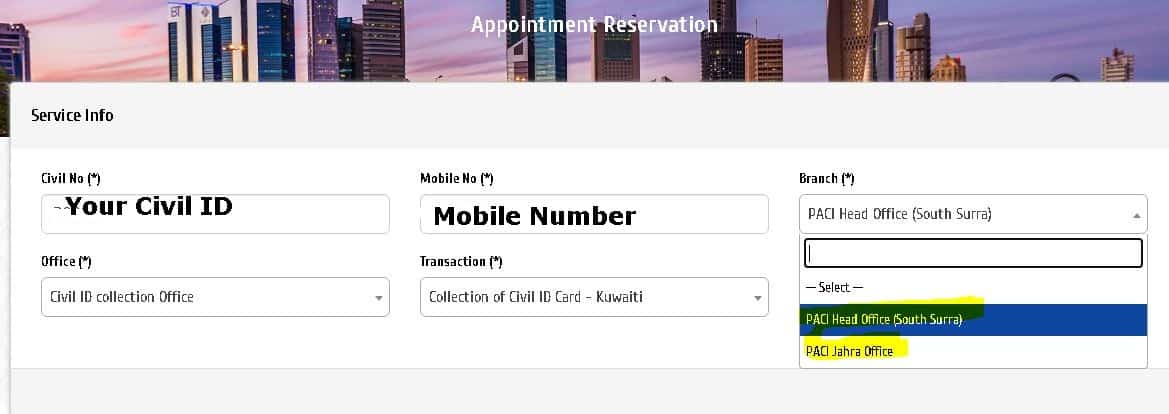 Enter the details : CIVIL ID Number, Mobile Number & Select the Branch office of the PACI Branches
Select OFFICE & Transaction – Click NEXT
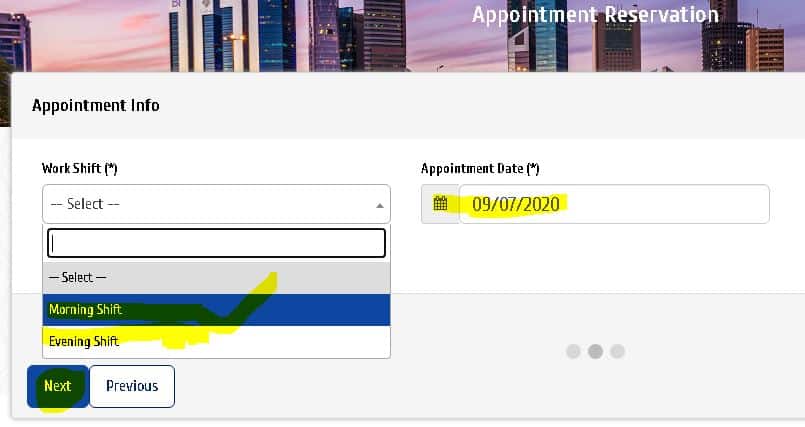
Select Morning / Evening Shift & Date. – Click Next.- Done.
Click on APPOINTMENT BOOKING mentioned below to START make appointment / reservation with PACI website – or
Go to this link https://indianinq8.com/paci-online-appointment-civil-id-office-book-appointment-system-iiq8/
to make appointment / reservation with PACI
Visit the PACI Office with the appointment proof – Go to the machine and insert your old CIVIL ID
Collect new CIVIL ID – Done.

E-Services
All E-Services provided by PACI that could be done over internet, and without personal attendance
E-Envelope
PACI Online Appointment & Civil ID Reservation System in Kuwait: How to Book Your PACI Appointment
The Public Authority for Civil Information (PACI) in Kuwait manages essential civil services such as issuing and renewing Civil IDs, updating personal information, and more. Due to the increasing demand and for better service efficiency, PACI introduced an online appointment and Civil ID reservation system.
This guide will walk you through everything you need to know about how to book a PACI appointment online and navigate the Civil ID reservation system easily.
What is PACI and Why is the Appointment System Important?
PACI is the government entity responsible for managing Civil ID cards in Kuwait. The Civil ID is an essential document for residents and citizens alike—it’s used for identification, accessing government services, and many legal transactions.
To reduce long queues and enhance service efficiency, PACI introduced an online appointment system that lets you:
- Schedule your Civil ID issuance or renewal appointment.
- Choose a convenient date and time.
- Avoid waiting in long lines at PACI centers.
How to Book a PACI Online Appointment
Booking your PACI appointment online is quick and simple. Here’s a step-by-step process:
Step 1: Visit the Official PACI Website
Go to the official PACI website: https://paci.gov.kw
Step 2: Access the Civil ID Reservation System
Look for the Civil ID Reservation System or Appointment Booking section.
Step 3: Enter Required Details
You will be asked to provide:
- Your Civil ID number or passport number
- Date of birth
- Contact information (phone number, email)
Step 4: Select Service Type
Choose the service you need, such as:
- New Civil ID issuance
- Civil ID renewal
- Civil ID replacement (lost or damaged)
- Information update
Step 5: Choose Appointment Date and Time
Pick a suitable date and time from the available slots.
Step 6: Confirm Your Appointment
Verify the details and confirm your booking. You will receive a confirmation message or email with your appointment details.
Important Tips for Your PACI Appointment
- Arrive on Time: Being punctual helps maintain the flow and reduces your waiting time.
- Bring Required Documents: Carry your existing Civil ID, passport, and any additional documents required.
- Follow Health & Safety Guidelines: PACI centers may have COVID-19 protocols; ensure to wear a mask and maintain social distancing.
- Cancel or Reschedule if Needed: If you cannot attend your appointment, cancel or reschedule online to free the slot for others.
Frequently Asked Questions (FAQs)
- Can I book an appointment for someone else?
Yes, you can book on behalf of a family member if you have their Civil ID number.
- What if I miss my appointment?
If you miss your scheduled time, you may need to rebook a new appointment online.
- Is the appointment system available for all PACI services?
The system mainly covers Civil ID issuance, renewal, and replacement services.
PACI online appointment, Civil ID Reservation System, Kuwait PACI appointment
PACI Website https://www.paci.gov.kw/Default.aspx
PACI Office Website https://www.paci.gov.kw/Default.aspx
Civil ID Office Website https://www.paci.gov.kw/Default.aspx
The PACI online appointment system and Civil ID reservation service make it easier than ever to manage your Civil ID needs in Kuwait. By booking your appointment online, you save time, avoid crowds, and ensure a smoother process when visiting PACI centers.
For the latest updates and to book your PACI appointment, always use the official PACI website.
PACI online appointment, Civil ID reservation Kuwait, PACI appointment booking, Civil ID renewal Kuwait, PACI Kuwait services, how to book PACI appointment, PACI appointment system online
Civil ID Website https://www.paci.gov.kw/Default.aspx
PACI Appointment Booking https://services.paci.gov.kw/booking/landing
Civil ID Appointment Booking https://services.paci.gov.kw/booking/landing
Kuwait Bataka Appointment Booking https://services.paci.gov.kw/booking/landing
PACI Website appointment Booking https://services.paci.gov.kw/booking/landing