

Explain About Triggers | Database Management Systems (DBMS) | iiQ8 Technology
Explain about triggers.
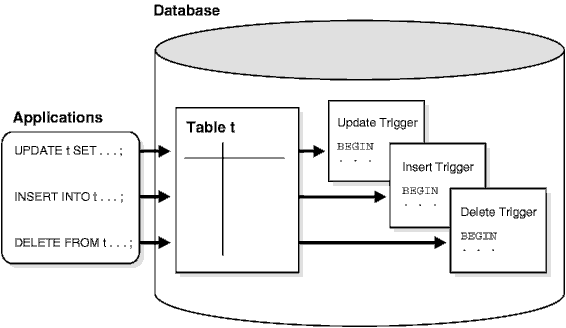
Explain about triggers | Triggers in Database Management Systems (DBMS)
Introduction
In modern database systems, maintaining data accuracy, consistency, and security is extremely important. One of the most powerful tools used to automate database operations and enforce rules is the database trigger. Triggers help databases respond automatically to certain events without requiring manual intervention or additional application code.
A database trigger is a set of stored instructions (procedural code) that is automatically executed by the database management system when a specified event occurs on a particular table or view. These events usually involve data manipulation operations such as inserting, updating, or deleting records.
Triggers play a crucial role in ensuring coordinated performance of related actions, enforcing business rules, maintaining data integrity, and auditing database activities.
Definition of Trigger
A trigger is a special type of stored program that automatically runs (or “fires”) when a predefined event occurs in the database.
In simple words:
A trigger is a mechanism that allows the database to take automatic action when data changes.
Unlike stored procedures or functions, triggers are not called explicitly by users. Instead, they are activated automatically by the database system itself.
Why Triggers Are Needed
Triggers are used in databases for several important reasons:
- To maintain data integrity
- To enforce business rules
- To perform automatic calculations
- To track changes (auditing)
- To improve database security
- To reduce repetitive coding in applications
They ensure that certain rules are always followed, regardless of how the data is modified.
Events That Activate Triggers
Triggers are activated by specific database events, mainly:
- INSERT – when new data is added to a table
- UPDATE – when existing data is modified
- DELETE – when data is removed from a table
For example:
- A trigger can activate whenever a new employee record is inserted.
- A trigger can run when a customer’s balance is updated.
- A trigger can log information when a record is deleted.
Types of Triggers
- Based on Timing
- a) BEFORE Triggers
- Executed before the triggering event occurs
- Commonly used to validate data
- Example: Checking whether a value is valid before inserting it into a table
- b) AFTER Triggers
- Executed after the event has occurred
- Often used for logging or auditing
- Example: Recording changes after an update is completed
- Based on Event
- a) INSERT Triggers
- Activated when a new record is inserted
- b) UPDATE Triggers
- Activated when data is updated
- c) DELETE Triggers
- Activated when data is deleted
- Based on Level
- a) Row-Level Triggers
- Executed once for each affected row
- Useful when operations depend on individual row values
- b) Statement-Level Triggers
- Executed once per SQL statement
- Used when the operation does not depend on specific row values
How Triggers Work
- A user or application performs an action on a table (INSERT, UPDATE, or DELETE).
- The database checks whether any trigger is associated with that action.
- If a trigger exists, it is executed automatically.
- The database completes the original operation after the trigger runs (or before it, depending on trigger type).
This entire process happens internally and does not require user intervention.
Uses of Triggers
- Enforcing Business Rules
Triggers ensure that important rules are followed.
- Example: Preventing negative values in a salary column.
- Data Validation
Triggers can check data correctness before it is stored.
- Example: Ensuring age is above a minimum value.
- Auditing and Logging
Triggers help track who changed data and when.
- Example: Storing old and new values during updates.
- Maintaining Referential Integrity
Triggers can maintain consistency between related tables.
- Example: Automatically deleting child records when a parent record is deleted.
- Improving Security
Triggers can restrict unauthorized changes.
- Example: Preventing deletion of critical records.
Advantages of Triggers
- Automatic execution without user action
- Improved data consistency and accuracy
- Centralized business logic inside the database
- Reduced application-level coding
- Enhanced security and auditing
Disadvantages of Triggers
- Can make database logic complex
- Difficult to debug and maintain
- May affect performance if overused
- Hidden execution (users may not know triggers are running)
Triggers vs Stored Procedures
| Feature | Triggers | Stored Procedures |
| Execution | Automatic | Manual |
| Invocation | Event-based | Explicit call |
| Purpose | Enforce rules, automation | Perform tasks |
| User Control | No direct control | Full control |
Triggers are an essential feature of database management systems that allow automatic execution of actions in response to data changes. They help enforce business rules, maintain data integrity, enhance security, and perform auditing efficiently. While triggers offer powerful automation, they must be used carefully to avoid complexity and performance issues.
In summary, database triggers act as silent guards, continuously monitoring and managing data operations to ensure the smooth and reliable functioning of a database system.
Important T-Codes for Every SAP Consultant (With Examples & Explanations) | iiQ8 SAP
Explain About Triggers | Database Management Systems (DBMS) | iiQ8 Technology
Top 15 Interview Questions and Answers on Triggers
- What is a database trigger?
Answer:
A database trigger is a set of stored instructions that is automatically executed when a specific event (INSERT, UPDATE, or DELETE) occurs on a table or view in a database.
- Why are triggers used in databases?
Answer:
Triggers are used to:
- Maintain data integrity
- Enforce business rules
- Automatically log or audit changes
- Improve database security
- Perform automatic calculations
- What events can activate a trigger?
Answer:
Triggers can be activated by:
- INSERT
- UPDATE
- DELETE
These events are known as Data Manipulation Language (DML) events.
- What are the main types of triggers based on timing?
Answer:
Based on timing, triggers are:
- BEFORE Trigger – Executes before the event
- AFTER Trigger – Executes after the event
- What is the difference between BEFORE and AFTER triggers?
Answer:
| BEFORE Trigger | AFTER Trigger |
| Executes before data modification | Executes after data modification |
| Used for validation | Used for logging/auditing |
| Can prevent invalid data | Cannot stop the operation |
- What are row-level and statement-level triggers?
Answer:
- Row-level trigger: Executes once for each affected row
- Statement-level trigger: Executes once for the entire SQL statement
- Can a trigger be executed manually?
Answer:
No, a trigger cannot be executed manually. It is automatically executed by the database when the defined event occurs.
- What is the difference between a trigger and a stored procedure?
Answer:
| Trigger | Stored Procedure |
| Executes automatically | Executed manually |
| Event-driven | Call-driven |
| Cannot accept parameters | Can accept parameters |
- Can we have multiple triggers on a single table?
Answer:
Yes, multiple triggers can be defined on a single table for different events such as INSERT, UPDATE, or DELETE.
- What is a DML trigger?
Answer:
A DML trigger is a trigger that fires in response to data manipulation operations such as INSERT, UPDATE, or DELETE.
- What are some real-life use cases of triggers?
Answer:
- Automatically updating account balances
- Logging changes to sensitive data
- Enforcing salary or age limits
- Preventing deletion of important records
- Can triggers improve database security?
Answer:
Yes, triggers can restrict unauthorized operations by preventing certain actions or logging suspicious activity.
- What are the disadvantages of using triggers?
Answer:
- Difficult to debug
- Can reduce performance if overused
- Increase database complexity
- Hidden logic makes maintenance harder
- Can triggers call stored procedures?
Answer:
Yes, triggers can call stored procedures, but it should be done carefully to avoid performance issues or recursive loops.
- What happens if a trigger fails during execution?
Answer:
If a trigger fails, the entire transaction is rolled back, ensuring data consistency and integrity.
Bonus Tip for Interviews
Always mention automatic execution, event-based behavior, and data integrity when explaining triggers.
Master Gmail with These 100 Tips – The Ultimate Productivity Guide | iiQ8 info