

Kuwait Civil ID Serial Number Check Online – Easy Guide 2026
If you need your Kuwait Civil ID serial number Check but do not have your physical Civil ID card with you, there are online methods that can help you access your Civil ID information.
The Civil ID serial number is different from your main Civil ID number. The Civil ID number identifies the individual, while the serial number is associated with the physical Civil ID card. This information can be useful when completing certain Kuwait government services, checking identification details or using digital government services. In this guide, we explain how to check your Kuwait Civil ID serial number online, where to find the number on your physical card, how to use the Kuwait Ministry of Interior website, and how the Kuwait Mobile ID app can help you access your digital ID information.
What Is a Kuwait Civil ID Serial Number?
The Civil ID serial number is a unique number associated with a Kuwait Civil ID card.
It is not the same as your Civil ID number.
Your Civil ID contains different pieces of information, including identifying details and card-related information.
The source guide states that the serial number is printed on the back of the physical Civil ID card.
If you have your physical Civil ID, you can normally look at the back of the card to locate the relevant serial/security information.
Civil ID Number vs Civil ID Serial Number
These two terms are sometimes confused.
Civil ID Number
The Civil ID number is the main identification number assigned to you in Kuwait’s Civil Information system.
It is commonly used for:
- Government services
- Banking transactions
- Residency-related services
- Telecommunications
- Healthcare
- Other official transactions
Civil ID Serial Number
The serial number is associated with the physical Civil ID card.
It can be used in certain electronic services and identification-related processes.
Therefore:
Civil ID Number ≠ Civil ID Serial Number
If a website specifically asks for your serial number, do not automatically enter your Civil ID number.
Where Can I Find the Civil ID Serial Number?
The easiest method is to look at the physical Civil ID card.
According to the source information, the serial number is located on the back of the Civil ID card.
If you do not have your physical card with you, you may still be able to access the relevant information through available online or digital-ID services.
Can I Check My Civil ID Serial Number Online?
Yes, the source guide describes an online method using the Kuwait Ministry of Interior (MOI) electronic services. It also explains how Mobile ID users can access card details through the Kuwait Mobile ID application.
The exact availability of information can depend on your Civil ID status and whether your card has already been issued.
If your Civil ID is still being processed, the serial number may not yet be available.
How to Check Civil ID Serial Number Online Through MOI
The Kuwait Ministry of Interior provides electronic services through its website. The source article describes the following process.
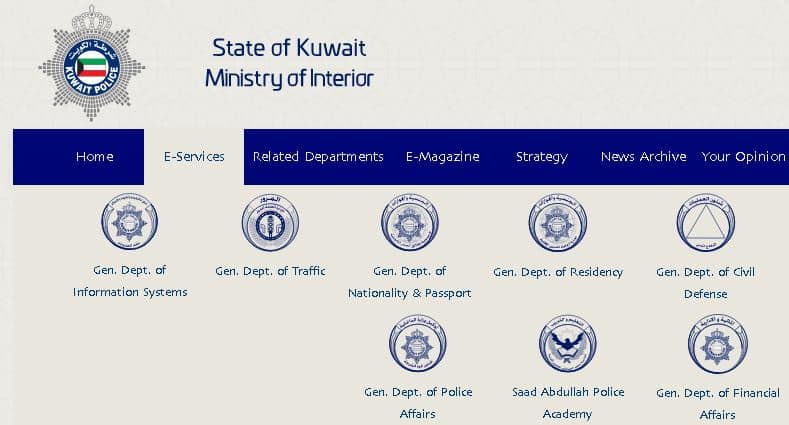
Step 1: Open the Kuwait Ministry of Interior Website moi.gov.kw/main?culture=en
Visit the official Kuwait Ministry of Interior website.
Look for the electronic services section.
Step 2: Select Electronic Services
From the MOI website, select:
Electronic Services
or
E-Services
The exact wording and website layout can change as government websites are updated.
Step 3: Select General Administration of Information Systems
From the available electronic services, select:
General Administration of Information Systems
This section provides access to relevant information services.
Step 4: Select Get Reference Number
Look for the option:
Get Reference Number
Select it to continue.
The source guide uses this service as the starting point for retrieving the relevant information.
Step 5: Enter Your Civil ID Number
Enter your Kuwait Civil ID number in the required field.
Make sure you enter the number correctly.
A single incorrect digit can cause the system to reject the request or display an error.
Step 6: Select Your Nationality
The system can ask you to identify your nationality category.
The source guide describes two options:
- Kuwaiti
- Other Nationality
Select the option that applies to you.
Step 7: Enter Additional Information
The information required can depend on your nationality.
For Kuwaiti Citizens
You may need to enter the date on which your Kuwaiti nationality was issued.
For Non-Kuwaiti Residents
You may need to enter:
- Passport number
- Passport expiry date
Enter the information exactly as shown on your official documents.
Step 8: Click Get
After entering all required information, select:
Get
The system will process the information.
Step 9: View Your Information
If the information is available and the details match the government’s records, the relevant Civil ID information can be displayed.
The source article states that the Civil ID serial number can then be viewed online.
Civil ID Serial Number Check Through Mobile ID
Another convenient option is the Kuwait Mobile ID application.
Mobile ID provides a digital version of your identification information and allows eligible users to access their digital ID details.
The source guide explains that Mobile ID users can access their card details through the app.
Step-by-Step Mobile ID Method
Step 1: Download Kuwait Mobile ID https://play.google.com/store/apps/details?id=kw.gov.paci.PACIMobileID&hl=en
Install the official Kuwait Mobile ID application from the appropriate app store.
It is available for:
- Android
- iPhone
Step 2: Open the Application
Launch the Mobile ID app after installation.
Step 3: Select Get Started
If you are setting up the application for the first time, select:
Get Started
Follow the registration instructions displayed by the app.
Step 4: Log In
If you already have a Mobile ID account, enter your PIN and select:
Login
Step 5: Open My ID
After logging in, select:
My ID
from the bottom menu.
Step 6: Open the Back of the Digital Card
The Mobile ID application provides a digital representation of your Civil ID.
Change the card view from the front to the back.
Step 7: Open Card Details
Look at the card details displayed by the application.
The source guide states that the Civil ID security number can be found in the Card Details section.
What Is the Civil ID Security Number?
You may see the term Security Number instead of Serial Number when using Kuwait Mobile ID.
The source article specifically refers to the number shown in the Mobile ID Card Details as the Civil ID security number.
Because different government services can use different terminology, always check exactly what number a particular online form is asking for.
If a form asks for:
Civil ID Number
enter your Civil ID number.
If it specifically asks for:
Serial Number / Security Number
use the relevant card information.
Civil ID Serial Number Check for Expatriates
Kuwait expatriates and residents can use the applicable electronic services to access their Civil ID information.
For non-Kuwaitis, the MOI process described in the source guide requires information such as:
- Civil ID number
- Passport number
- Passport expiry date
The information should match the official records.
If your passport has recently been renewed or your information has recently changed, make sure your government records have been updated before trying the service again.
Civil ID Serial Number Check for Kuwaiti Citizens
Kuwaiti citizens can also use the relevant MOI electronic service.
The source guide states that Kuwaiti citizens may need to provide:
- Civil ID number
- Date of issuance of Kuwaiti nationality
After entering the required information, select Get to retrieve the available information.
What If I Lost My Physical Civil ID?
If you have lost your physical Civil ID card, you may still need your Civil ID information for other transactions. In this situation, Kuwait Mobile ID can be particularly useful if you have already registered and can access your digital identification. You should also follow the appropriate procedure for reporting and replacing a lost Civil ID. Do not assume that obtaining the serial number replaces the requirement to report a lost card.
Can I Check the Serial Number Without the Physical Card?
In some cases, yes.
The source guide provides an MOI online method and a Mobile ID method for accessing the information. However, online availability depends on the status of your records. If your card has not yet been issued, the serial number may not be available.
What If My Civil ID Is Still Being Processed?
If your Civil ID application is still being processed, the serial number may not yet be available. The source guide specifically states that the serial number will not be available until the card has been issued. Therefore, if you have recently applied for a new Civil ID, do not be surprised if the serial number cannot be retrieved immediately.
Civil ID Serial Number Check Link
There may not be a single webpage where you simply enter your Civil ID number and immediately see the serial number.
Instead, you may need to access the appropriate Kuwait government electronic service.
The source guide also points users toward Kuwait Mobile ID as a way to access their digital identification information.
For safety, always use official Kuwait government websites and the official Mobile ID application rather than entering your Civil ID or passport information into unknown third-party websites.
Why Do You Need the Civil ID Serial Number?
The serial number can be requested for certain government and electronic transactions.
Civil ID-related information can be used when accessing services such as:
- Government electronic services
- Traffic-related services
- Driver’s license transactions
- Civil ID services
- Digital identity services
- Other identification-related transactions
The source guide notes that Civil ID information can support electronic services including traffic fine payment and certain renewal services.
Civil ID Serial Number for Government Services
Some government websites or applications may ask for more than your Civil ID number.
Depending on the service, you could be asked for:
- Civil ID number
- Civil ID serial/security number
- Passport number
- Passport expiry date
- Mobile number
- Other identification information
Always read the field label carefully before entering information.
Common Problems When Checking Civil ID Serial Number
Problem 1: Serial Number Is Not Showing
If your Civil ID has not yet been issued, the serial number may not be available.
Wait until the card is issued and check again.
Problem 2: Incorrect Passport Information
For non-Kuwaiti residents, the MOI service may require passport information.
Check:
- Passport number
- Passport expiry date
Make sure the information matches your official records.
Problem 3: Incorrect Civil ID Number
Double-check every digit of your Civil ID number.
Do not accidentally enter your passport number or another reference number.
Problem 4: Nationality Selection Is Incorrect
If the system asks you to choose between Kuwaiti and Other Nationality, select the correct category.
Problem 5: Mobile ID Login Problem
If you are using Mobile ID:
- Check your PIN.
- Make sure the application is updated.
- Check your internet connection.
- Restart the application.
- Try logging in again.
If the problem continues, use the official Mobile ID support options.
Important Difference: Civil ID Number, Serial Number and Reference Number
These terms can easily cause confusion.
Civil ID Number
Your primary personal identification number.
Civil ID Serial/Security Number
A card-related number associated with your Civil ID.
Reference Number
A different number that may be generated or used by a government service.
These numbers should not automatically be treated as interchangeable.
If a form specifically asks for a particular number, enter the corresponding information.
How to Find Civil ID Serial Number on the Physical Card
If you have your physical Civil ID:
- Take your Civil ID card.
- Turn it over to the back.
- Look at the card details.
- Identify the serial/security information.
- Enter it exactly as requested by the government service.
The source article states that the serial number is located on the back of the Civil ID.
How to Find Civil ID Serial Number Using Mobile ID
The process is simple:
- Open Kuwait Mobile ID.
- Log in.
- Select My ID.
- Change the digital card view to the back.
- Open Card Details.
- Locate the security/serial information.
The source guide describes this process for Mobile ID users.
Is Civil ID Serial Number the Same as Card Number?
Not necessarily.
The Civil ID contains several numbers and pieces of information.
The Civil ID number identifies the person, while the serial/security number is associated with the card.
If an online form asks for the serial number, use the card’s serial/security information rather than automatically entering the Civil ID number.
Is the Civil ID Serial Number Available on Mobile ID?
The Mobile ID application can display card details, including the security number described by the source guide.
Open:
My ID → Back of Card → Card Details
and check the information displayed there.
Is It Safe to Enter My Civil ID Number Online?
Only enter your Civil ID, passport or other personal information on trusted official government websites and applications.
Avoid websites that:
- Ask for unnecessary personal information
- Request your banking password
- Ask for your Mobile ID PIN
- Request OTP codes
- Claim to provide government services without being an official provider
Never share your Mobile ID PIN or one-time verification code with another person.
Civil ID Serial Number Check – Quick Guide
If you need the information quickly, follow these steps.
Method 1: MOI Website
- Open Kuwait Ministry of Interior electronic services.
- Select General Administration of Information Systems.
- Select Get Reference Number.
- Enter your Civil ID number.
- Select Kuwaiti or Other Nationality.
- Enter the requested additional information.
- Click Get.
- Check the available Civil ID information.
Method 2: Mobile ID
- Open Kuwait Mobile ID.
- Log in.
- Select My ID.
- Turn the digital card to the back.
- Open Card Details.
- Check the displayed security/serial information.
Civil ID Serial Number Checklist
Before trying the online service, keep the following information available:
- Civil ID number
- Passport number, if you are a non-Kuwaiti
- Passport expiry date
- Kuwaiti nationality issue date, if applicable
- Mobile ID PIN, if using Mobile ID
- Smartphone with internet access
- Official Mobile ID application
Frequently Asked Questions – Kuwait Civil ID Serial Number Check Online – Easy Guide 2026
What is the Kuwait Civil ID serial number?
The Civil ID serial number is a unique card-related identifier associated with the Kuwait Civil ID. The source guide states that it is found on the back of the physical card.
Is the Civil ID number the same as the serial number?
No. The Civil ID number and card serial/security number are different pieces of information.
Can I check my Civil ID serial number online?
Yes. The source guide describes an MOI electronic-services method and a Kuwait Mobile ID method for accessing relevant Civil ID card information.
How can I check my Civil ID serial number online?
Use the applicable Kuwait Ministry of Interior electronic service, enter your Civil ID and requested personal information, and select Get. Alternatively, eligible Mobile ID users can check the card details through the app.
Where is the Civil ID serial number printed?
It is printed on the back of the physical Civil ID card, according to the source guide.
Can expatriates check their Civil ID serial number?
Yes. The MOI process described in the source guide provides an option for Other Nationality, where passport information is requested.
What information do expatriates need?
The source guide states that non-Kuwaitis may need their Civil ID number, passport number and passport expiry date.
What information do Kuwaiti citizens need?
The source guide states that Kuwaiti citizens may need their Civil ID number and the date their Kuwaiti nationality was issued.
Can I find the serial number through Kuwait Mobile ID?
Yes. Mobile ID users can open My ID, switch to the back of the digital card and check the Card Details section. The source guide identifies the security number there.
What is the Civil ID security number?
It is the card-related security information displayed in the Mobile ID card details. The terminology can vary between services, so check the exact field requested by the government application.
Can I find my serial number if my Civil ID is still being processed?
Usually not. The source guide states that the serial number is not available until the Civil ID card has been issued.
Can I check my serial number if I lost my Civil ID?
If you already have access to Kuwait Mobile ID, you may be able to view your digital card details. You should also follow the official procedure for reporting and replacing the lost physical Civil ID.
Do I need my passport to check the serial number?
Non-Kuwaiti users may need their passport number and passport expiry date when using the MOI service described in the source guide.
Can I check the serial number using only my Civil ID number?
The MOI service may request additional information depending on whether you are Kuwaiti or a non-Kuwaiti resident. Therefore, keep the required supporting information available.
Is there a direct Civil ID serial number check link?
There may not be a standalone webpage dedicated exclusively to the serial number. You should access the appropriate official MOI electronic service or use Kuwait Mobile ID.
Is the Civil ID serial number printed on the front?
The source guide states that the serial number is located on the back of the Civil ID.
Why is my Civil ID serial number not available?
The card may still be processing, your information may not match the government records, or the particular service may not be displaying the information. If the card has not been issued, the serial number may not yet exist in the available card information.
Can I use the serial number for Civil ID renewal?
Some government transactions can request card-related information, but whether the serial number is required depends on the specific service.
Is Mobile ID the same as a physical Civil ID?
Mobile ID provides a digital form of identification. It can be used for eligible digital identity services, but it does not necessarily eliminate every requirement associated with the physical Civil ID card.
Checking your Kuwait Civil ID serial number online can be useful when you do not have your physical Civil ID card available.
There are two practical methods described in the source information:
MOI Electronic Services → Enter Civil ID/required information → Get
or
Kuwait Mobile ID → My ID → Back of Card → Card Details
The physical Civil ID card normally contains the relevant serial information on its back, while Mobile ID can provide access to digital card details.
Remember that your Civil ID number and Civil ID serial/security number are not necessarily the same thing. Always check which number a particular government service is requesting.
If your Civil ID is still being processed, the serial number may not yet be available.
For security, only use official Kuwait government websites and the official Mobile ID application when entering your Civil ID, passport or other personal information.
PACI Online Appointment Kuwait – Book Civil ID Appointment Best Step by Step 2026
Kuwait Civil ID, Civil ID Serial Number, Civil ID Serial Number Check, Kuwait MOI, Kuwait Mobile ID, PACI Kuwait, Civil ID Online, Civil ID Security Number, Kuwait Government Services, Civil ID Information, Kuwait Expatriates, Kuwait Citizens